 Aloke
Team performance
Each employee's sales, the visits they recorded, their invitations, and order times.
- Aloke Owners
- Web, iPhone and iPad, Android
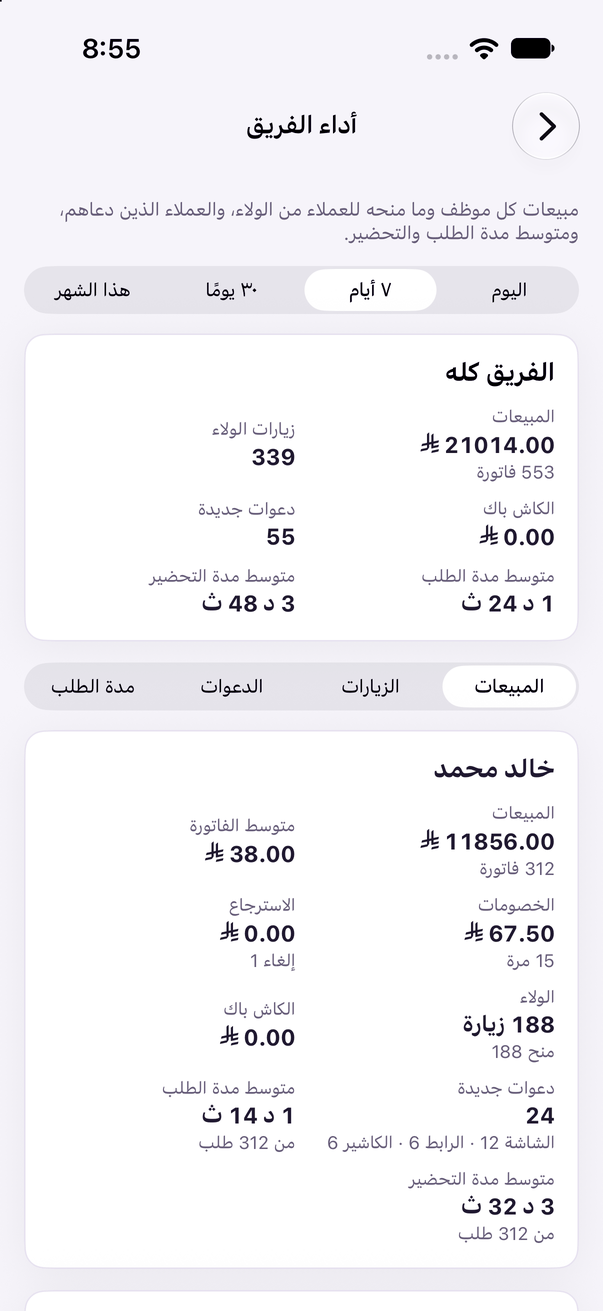
One page gathers each employee's work: what they sold, how many visits they recorded, how many customers came through their invitation, and how long orders and preparation take.
- On the web: «الفريق» (Team), then «أداء الفريق» (Team performance). (Web)
- In the Aloke Owners app, open «Team» from «Every section» on the home screen, then «Team performance». (iPhone and iPad, Android)
- Choose the period: «اليوم» (Today), «٧ أيام» (7 days), «٣٠ يومًا» (30 days) or «هذا الشهر» (This month), and the branch if you have more than one.
- «الفريق كله» (The whole team) is at the top, with a card per employee below. Sort them by «المبيعات» (Sales), «الزيارات» (Visits), «الدعوات» (Invitations) or «مدة الطلب» (Order time).