 Aloke
AlokeOrder Ahead: your customer orders and pays before arriving
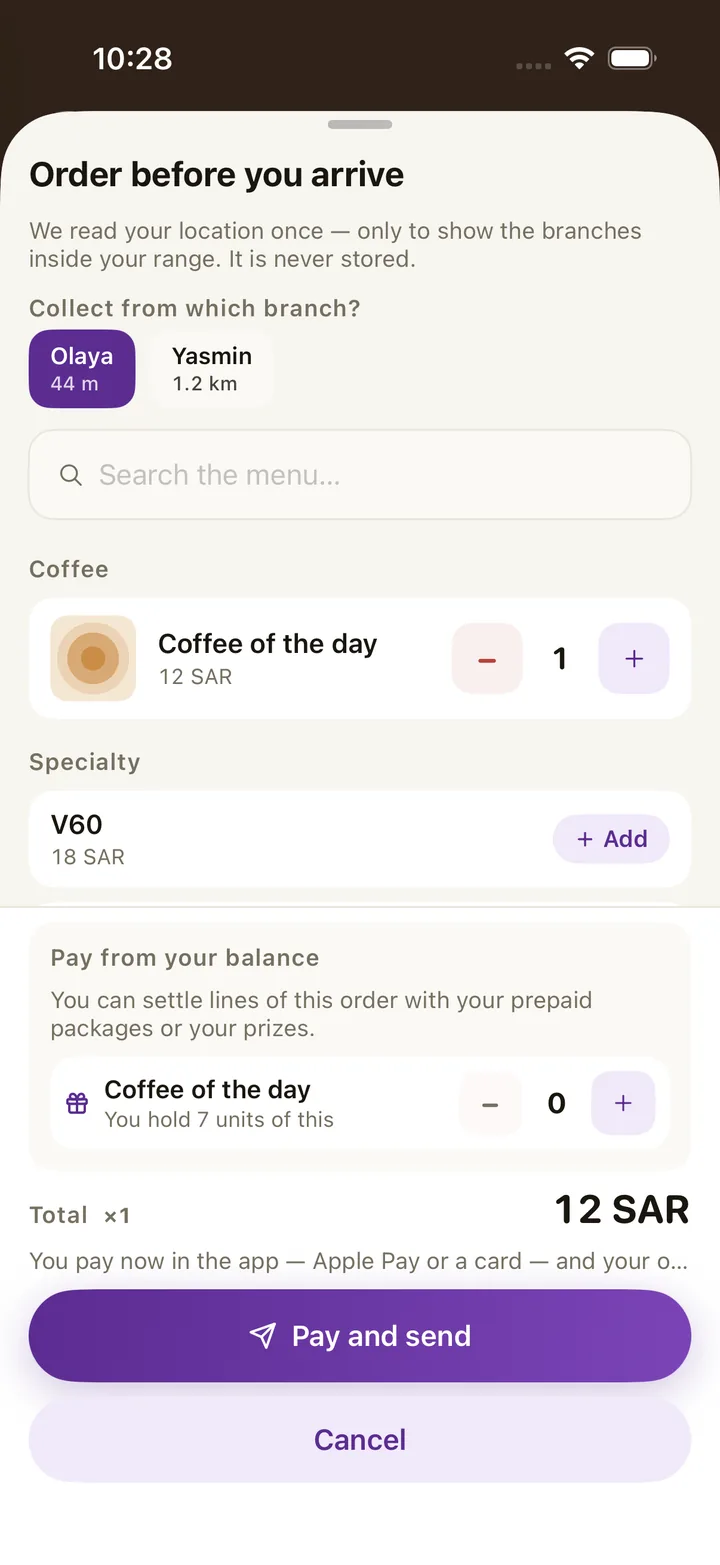
Your customer opens your shop's card in Aloke Wallet, chooses from your menu and pays with Apple Pay or a card. The order reaches the kitchen screen and Aloke POS at the same moment, and one scan at pickup hands it over and adds the stamp.
- SAR 399 per branch every three months
- needs Aloke POS
- in Aloke One
How it works
- Paid before the kitchen. The customer pays in the app through the payment gateway before the kitchen sees the order: Apple Pay and card on iPhone, card on Android.
- The range. You set the allowed distance for each loyalty tier, and the customer's location is checked once and never stored.
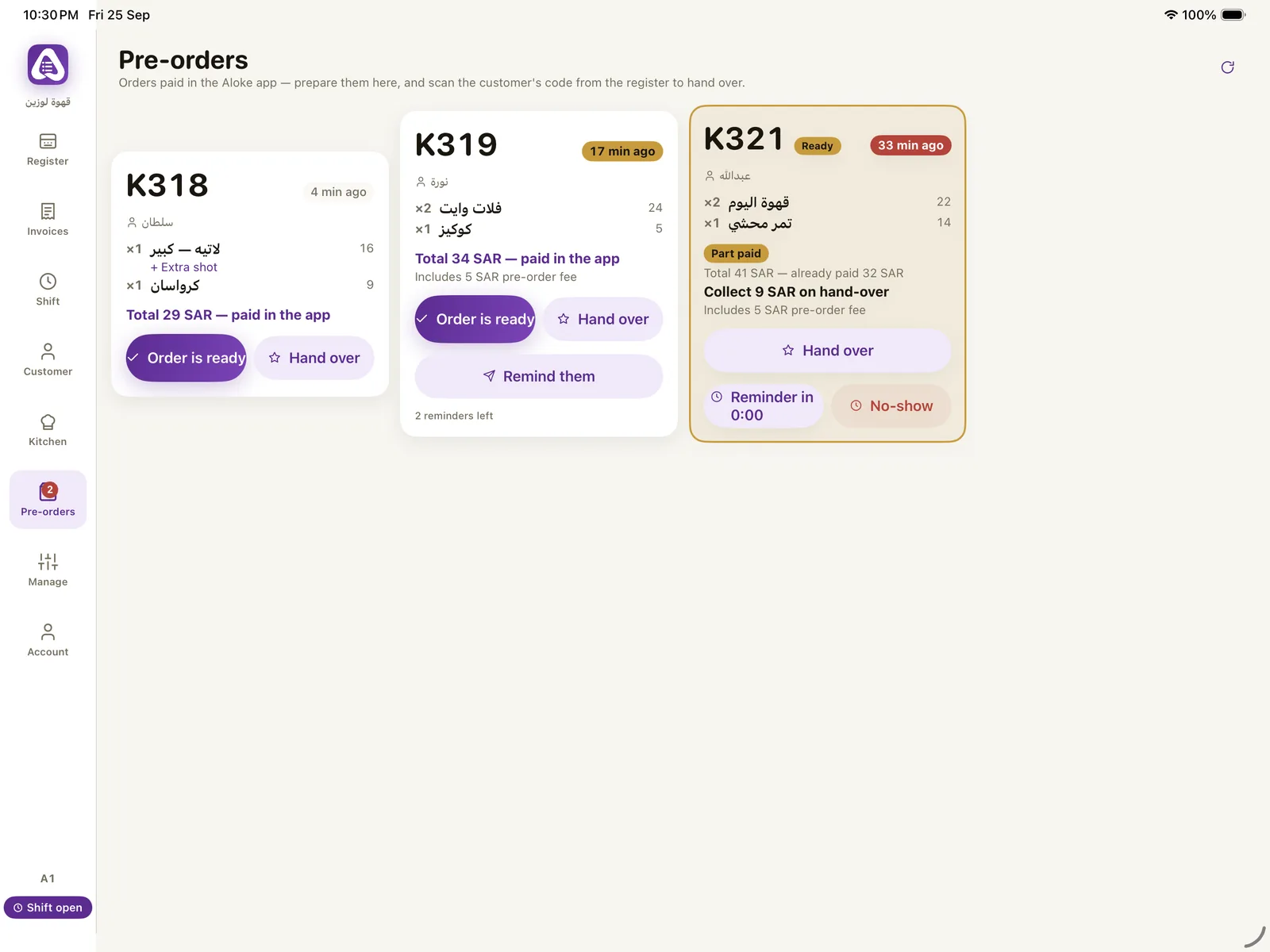
- A code for every order. A letter and three digits like A314, and one open order per customer in each shop.
- Balances pay too. A bundle unit or an earned prize covers a line, and an order covered in full goes straight to the kitchen.
- A fee or a mark up. An amount or a percentage per item, or an order fee always or below a threshold, printed as its own invoice line.
- Ready, then pickup. «Ready» notifies the customer, and scanning the order code hands it over and records the visit.
- Reminders and no shows. Up to three reminders five minutes apart, and «No show» stops Order Ahead for that customer at your shop until you lift it.
- In Aloke POS and on the invoice. A paid order reaches Aloke POS with its kitchen ticket, its invoice and automatic printing, and the customer finds the invoice in the app.
- Kerbside. Switched on per branch with a range of 25 to 3000 metres; the customer adds their plate, and the plate shows on the screen, the ticket and the invoice. Pause it in a rush.
The apps it runs in
Aloke Wallet
Every shop whose programme you join becomes a card in your wallet: your stamps, points, prizes and bundles. From the same card you order and pay before you arrive, find your invoice, and send a friend a gift.
Aloke Owners
What you need to run your shop when you are away from it: today's numbers, orders, the menu, offers, staff, stock and the books, with an alert for everything that matters to you.
Aloke Scan
Your staff scan the customer's card code from their phone or Apple Wallet to add the visit, or to spend a prize or a cup from a bundle, and see the orders coming ahead and hand them over.
Aloke Display
Put up an iPad or an Android device, pair it with a six character code from Aloke Owners, and pick its role. It needs no account and no password.
Works together with
Aloke POS
Tap the item, pick its size and extras, and close with cash, card or both. Aloke POS issues an electronic invoice for every sale, closes the shift with the difference written out, and takes stock down with every sale.
The kitchen screen and printing
Before your customer locks their phone, the order is in your kitchen: it appears on the kitchen screen and in Aloke POS at the same moment, with a ticket for every station and a screen that says what has started and what is ready.
Offers and cashback
You build an offer once and it works in Order Ahead, kerbside, Aloke POS and the kiosk. You choose who, when, how often, and whether it combines with others.
Shops running on Aloke
Vero Roastery
A roastery and café in Jazan
Fillin Good
Cookies and specialty coffee in Jazan
Duhm Cafe
A café in Samtah
Cupcan Cafe
A café in Jazan
ChillFuel
A café in Jazan
Questions
Does the customer pay before arriving?
Yes. Payment happens in the app before the kitchen sees the order, or with a bundle unit or an earned prize.
Is the customer's location stored?
No. It is checked once against the range and never stored.
Does it need Aloke POS?
Yes. Order Ahead needs Aloke POS, and both are in Aloke One.
How does the money reach the shop?
Through the payout account at the payment gateway to your business IBAN, once your documents are approved.
How much is it?
SAR 399 per branch every three months, or SAR 1,490 a year.
Register your business and branches, choose your systems and pay, and our team reviews your application; then you start from your console. Priced per branch, every three months or every year, with no setup fee.
Get started