Your account in Aloke Owners
Name, language and theme, the tour, signing out, and deleting the account.
- Aloke Owners
- iPhone and iPad, Android
- Open «حسابك» at the bottom of the home screen.
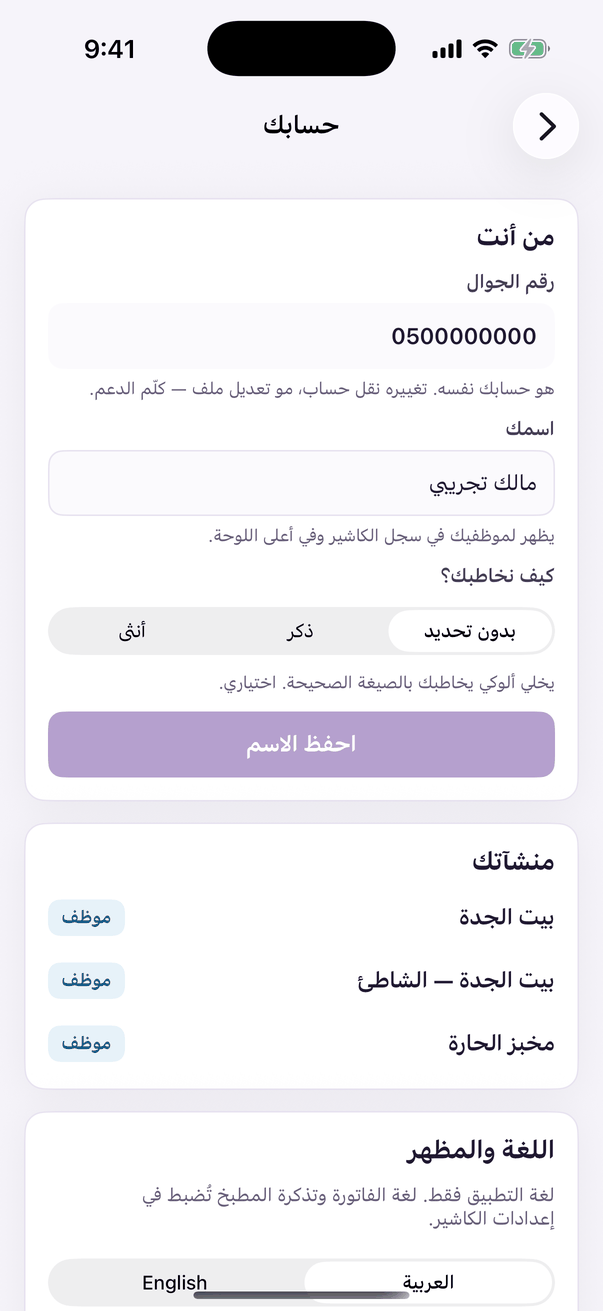 «Your account»: name, language, alerts and sign out.
- Your name
- Type your name and press «احفظ الاسم» (save), and choose «كيف نخاطبك؟» (how we address you).
- Language and theme
- «اللغة» Arabic or English, and «المظهر» light, dark or «اتبع إعداد الجهاز» (follow the device).
- The guide and the tour
- «دليل الملّاك» opens this help center, and «شاهد الجولة التعريفية من جديد» replays the tour.
- Sign out
- «تسجيل الخروج» signs you out of this device only.
Open this article in the interactive help center
In the same section
 Aloke
Aloke