 Aloke
AlokeFeatures the Aloke team switches on: signage, kitchen sections and nearby notifications
What they are, where you find them when they are on, and what you see when they are not.
- Aloke Owners
- Web, iPhone and iPad, Android
Some features do not come with a system on their own; the Aloke team switches them on for your business. When they are on you find their pages in their place. When they are not, you see «هذه الميزة غير متاحة لحسابك» (This feature isn't available for your account) and can open a support ticket, and our team gets back to you.
- Digital signage
- Playlists, programs and a schedule for your screens, on iPad, Android, Apple TV and Android TV. You find it in «الولاء والتسويق» (Loyalty & marketing) under «الشاشات واللافتات» (Screens and signage).
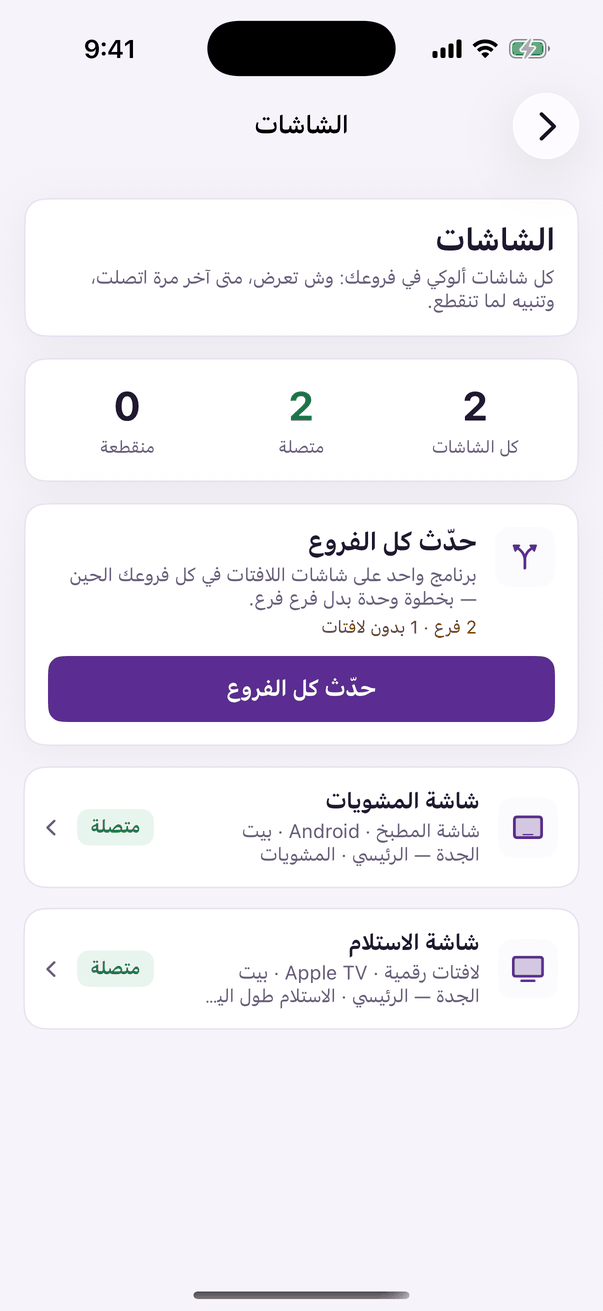
«Screens»: every screen in your branches and its state, and «Update every branch». - Kitchen sections
- Each kitchen section with its own screen and printer, and a «جاهز للاستلام» (Ready to collect) board with order numbers. It needs digital signage.
- Nearby notifications
- Your message on the Wallet card when a customer comes near your branch. Its page shows in «الولاء والتسويق» only when it is on for your brand.
- In Aloke Owners, press «افتح تذكرة دعم» (Open a support ticket) under the sentence, and the request reaches the team with the name of the feature you were on. (iPhone and iPad, Android)
- On the web open «الدعم» (Support) at the top of the panel, and choose «أرسل طلبًا» (Send a request). (Web)