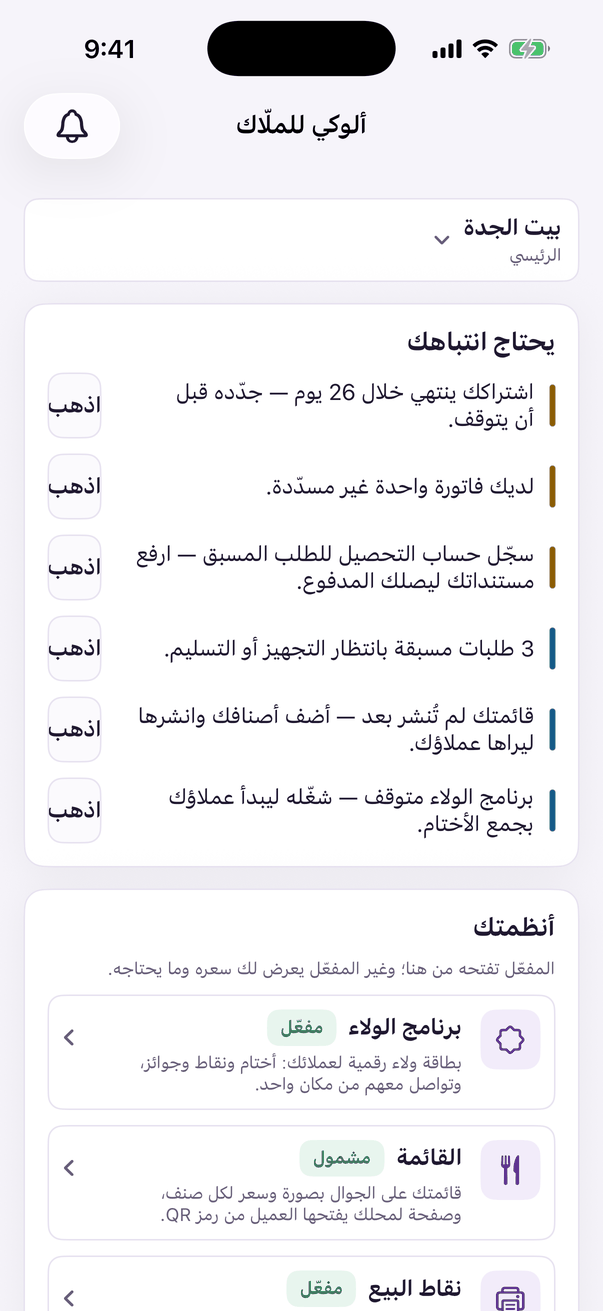
The groups on the home screen, and where each screen lives.
Aloke Owners
iPhone and iPad, Android
Aloke Owners is the web panel arranged for your phone. The home screen opens with «يحتاج انتباهك» (a subscription about to end, an unpaid invoice, orders waiting) and «أنظمتك», with the groups below, each holding its screens. On an iPad the groups sit in a rail beside the screen.
The Aloke Owners home screen: pick the branch at the top; each group holds its screens.
Pick the branch at the top of the home screen. Every screen you open follows it.
Your business, Your menu, Your page
Details, opening hours and what Aloke should know; then sections, items, add-ons, combos and deals; then page design, translations and the QR card.
Brand and branches
Branches, settlements, and sold out today.
Loyalty, offers, feedback
Programme basics, prizes, card and tiers; then offers and discounts; then complaints, suggestions and reviews.
Employees, operations, customers
Employees; then till rules and bundles; then the dashboard, members, segments, add by hand, and insights.
Appointments, reaching them
Calendar, services, team and hours, and appointment settings (for branches Aloke opened appointments on); then reach and Glimpses.
Aloke POS, connect a display
Till settings, printing, inventory, when to order, shifts, VAT and invoicing, register reports and payables; then connect a display.
Pre-Order, accounting, kiosk, hall
Each one shows when the branch holds it.
Subscription and billing, your account
Subscription and invoices; then your account, with your name, language, alerts and sign out.
 Aloke
Aloke