 Aloke
AlokeWhen to order: delivery times and reorder alerts
Type how many days the supplier takes, and we work out from your branch's use when to order and how much, and tell you before it runs out.
- Aloke Owners
- Web, iPhone and iPad, Android
The delivery time
Some items do not arrive the day you order them، packaging can take two weeks. Give each item «مدة التوصيل من المورد (أيام)» (Supplier delivery time, in days): from the day you order until it arrives. Or type it once for the supplier in «مدة التوصيل المعتادة (أيام)» (Usual delivery time), and every item of that supplier without its own takes it.
- In the Aloke Owners app, open «Aloke POS» from the home screen, then «When to order». (iPhone and iPad, Android)
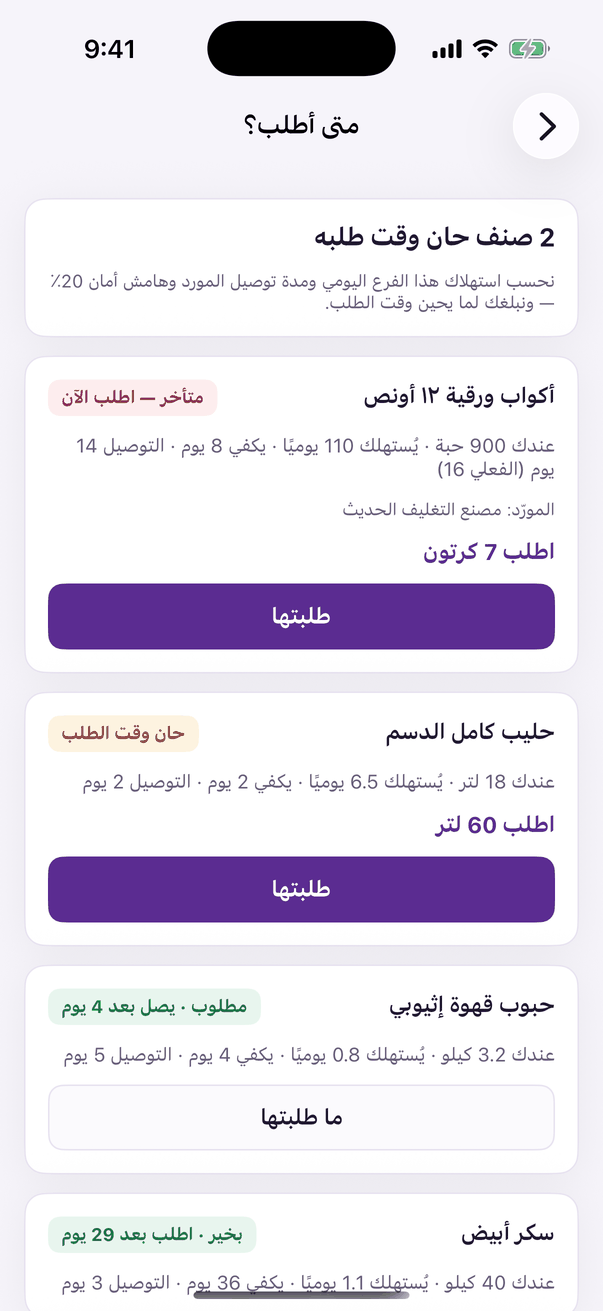
«When to order»: delivery time, and a warning before it runs out. - Open «المخزون» (Stock) then the item, type «مدة التوصيل من المورد (أيام)», and press «حفظ» (Save). For a supplier: «المشتريات» (Purchasing) then «الموردون» (Suppliers), «مدة التوصيل المعتادة (أيام)», then «حفظ».
How it is worked out
We read from this branch's own record how much of the item leaves the shelf each day، sales net of returns, waste, production, a transfer to another branch، over the last 28 days and over the last 7, and take the higher: a busy week is believed at once, a quiet one never talks you into running out. Then: daily use × delivery days × (1 + safety margin) is what must still be on the shelf on the day you order. What is already coming، a purchase order sent to the supplier, or «طلبتها» (I ordered it) with a quantity، counts with you, so you are never asked twice.
The alert
The moment an item is due you get a notification on «ألوكي للملاك» (Aloke Owners)، and so does every employee holding «تنبيهات إعادة الطلب» (Reorder alerts). If you have not ordered, one reminder comes each morning from 9 until you do. Items that fall due together come in one notification for the branch.
- In «المخزون» open «متى أطلب؟» (When to order)، the items are sorted most urgent first: «متأخر — اطلب الآن» (Late، order now), then «حان وقت الطلب» (Order now). Once you have ordered from the supplier by phone or WhatsApp, press «طلبتها», type the quantity if you like, then «سجّل» (Record). The reminders stop until the goods arrive.