 Aloke
AlokeReports and payments through the payment gateway
More than fifty reports in one place, and every payment through the payment gateway: what the customer paid, what the payment gateway took and what reached your shop.
- Aloke Owners
- Web, iPhone and iPad, Android
All reports
In «التقارير» (Reports) open «كل التقارير» (All reports): more than fifty reports straight from your books, in groups: sales, online payments, cash and banks, purchases and suppliers, stock, expenses, payroll, loyalty and packages, performance, the ledger and the audit trail.
- In the Aloke Owners app, open «Accounting» from the home screen, then «Reports». (iPhone and iPad, Android)
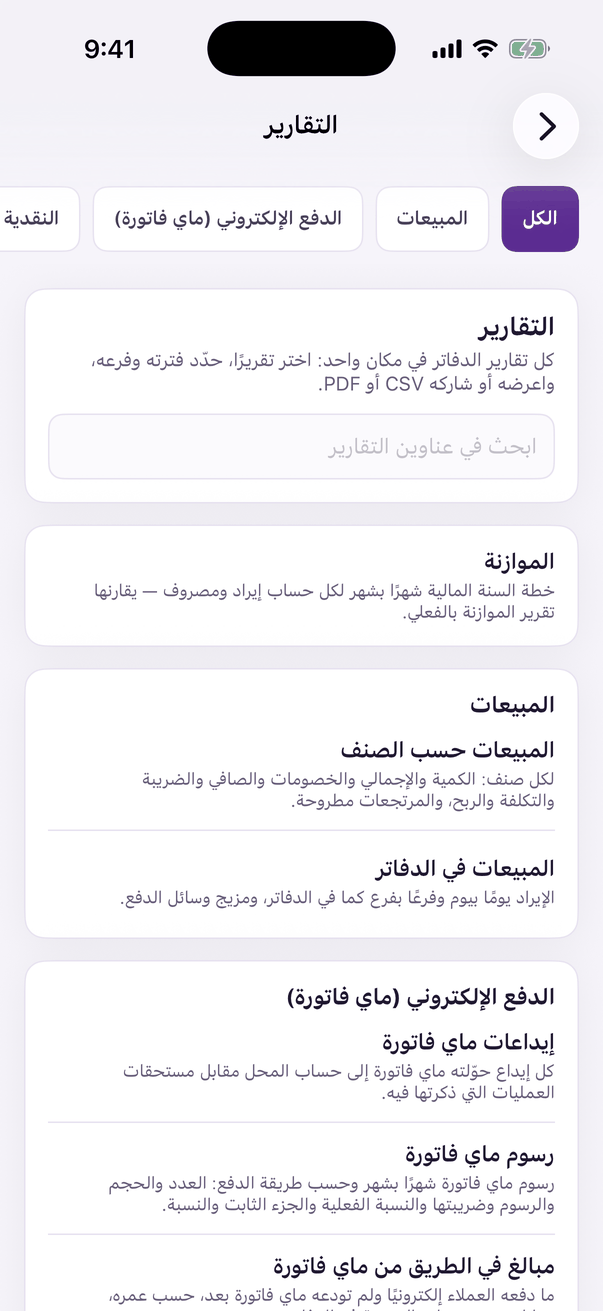
The accounting «Reports». - Type in «ابحث في التقارير» or pick a group, open the report, choose the period and the branch, and press «عرض» (Show). You can «تنزيل CSV» or «طباعة / PDF».
Payments through the payment gateway
«عمليات الدفع الإلكتروني» (Online payments) lists every payment through the payment gateway as the payment gateway reported it: «ما دفعه العميل» (what the customer paid), «رسوم بوابة الدفع (ServiceCharge)» and its VAT, «عمولة ألوكي» (Aloke's commission), «ما يصل إلى المحل» (what reaches the shop), what was refunded and the deposit that carried it to your bank. Press a payment for its full detail.
- In «السياسات والإعدادات», under «بوابة الدفع», type «الرسم الثابت لكل عملية (ر.س)» as in your shop's contract with the payment gateway, and save.
Match the figures day by day in «مطابقة الدفع الإلكتروني» (Online payments reconciliation), see what is not deposited yet in «مبالغ في الطريق من بوابة الدفع» (In transit), and the deposits themselves in «إيداعات بوابة الدفع».
- In «الموازنة» (Budgets) pick the year, press «أضف حسابًا» or «أنشئها من فعلي سنة سابقة», type each month's amount, then «احفظ الموازنة». Compare it with what happened in «الموازنة مقابل الفعلي» (Budget against actual).