 Aloke
AlokeBills and expenses
Rent, electricity and every bill you pay. Once or every month, with its photo attached.
- Aloke Owners
- Web, iPhone and iPad, Android
Bills
Every bill you pay other than a stock supplier's goods، rent, electricity, water, internet, maintenance, fees، is recorded in «المصروفات», and spread across your branches.
- In the Aloke Owners app, open «Accounting» from the home screen, then «Bills». (iPhone and iPad, Android)
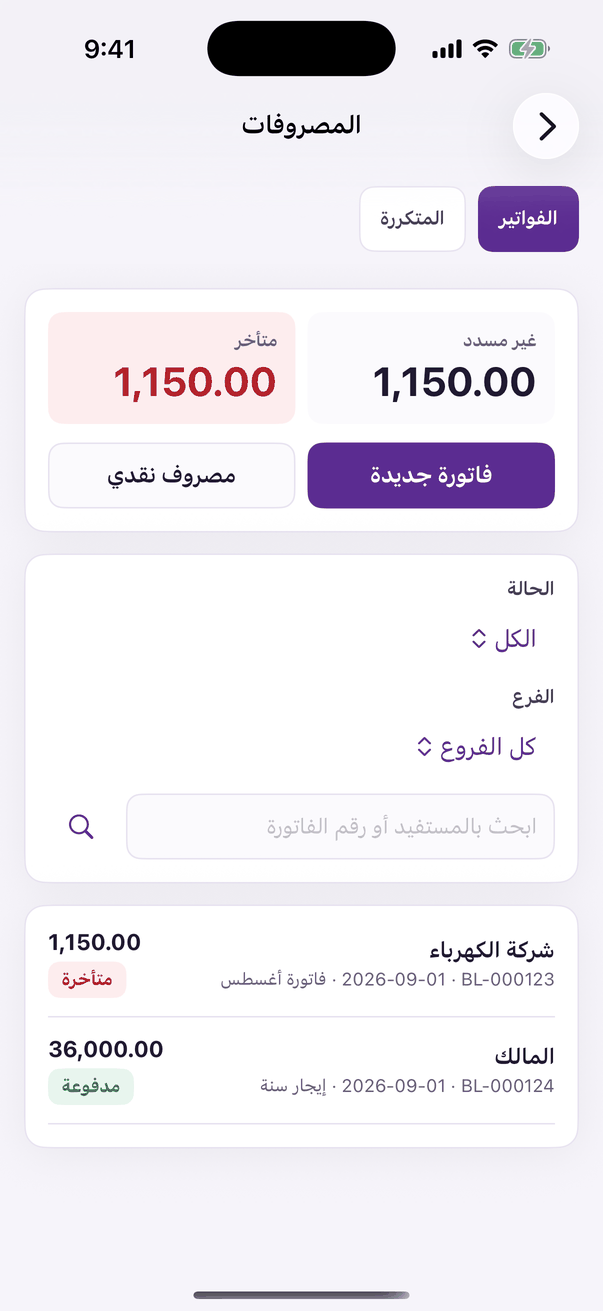
«Bills»: bills, cash expenses and recurring ones. - Press «فاتورة جديدة», type the payee and the date, pick each line's expense type, branch, amount and VAT, attach the bill's photo, then «احفظ ورحّل». Paid in cash from the drawer? Choose «مصروف نقدي».
- A bill that comes back every month is set up once in «المصروفات المتكررة»: the amount, how often and the first date, and it creates itself when due.