168 squares on the Riyadh clock. The grid you build your shifts on.
Aloke Owners
Web, iPhone and iPad, Android
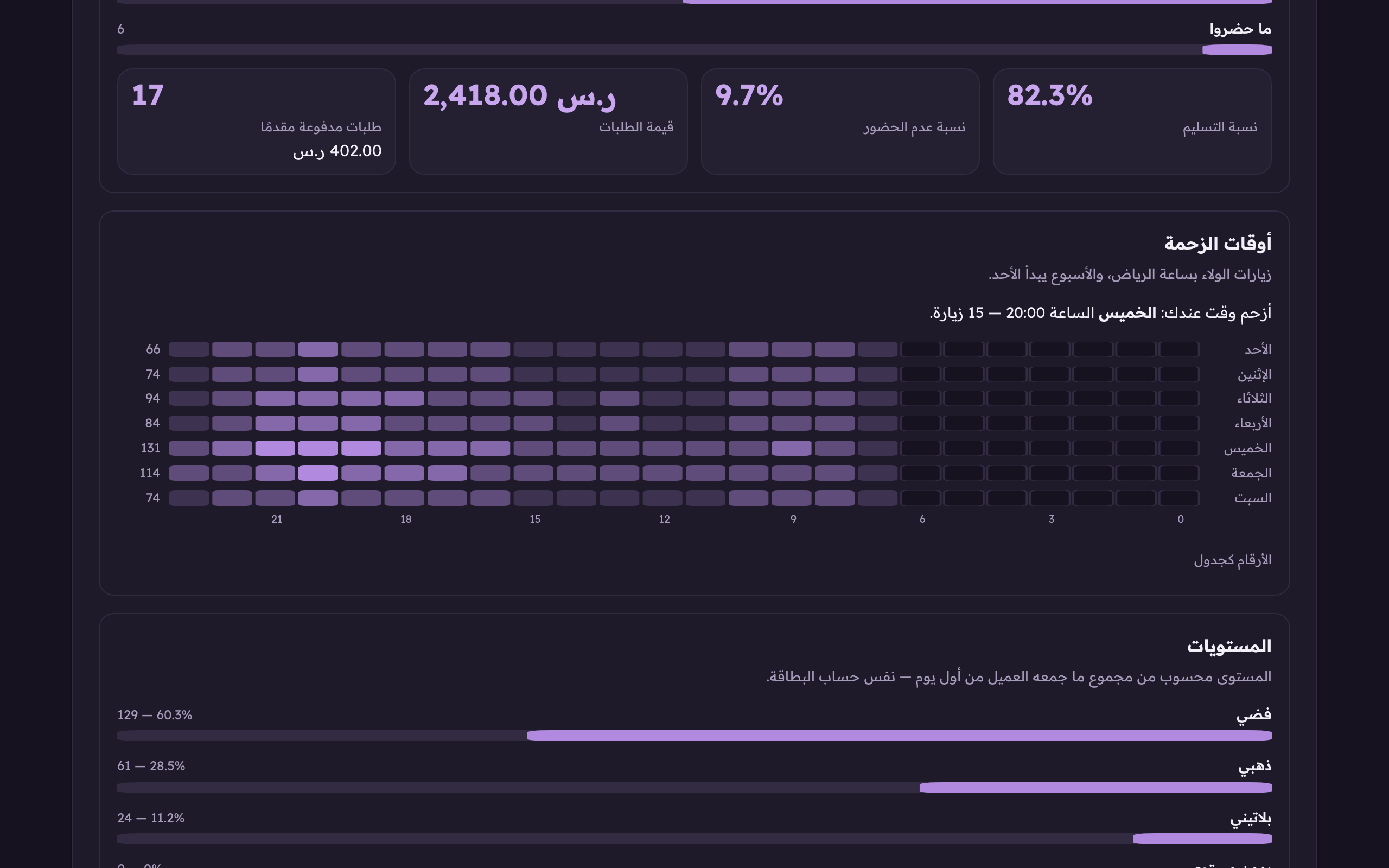
«Busy hours» is a grid of 168 squares: seven days by twenty-four hours. Each square is how many loyalty visits happened in that hour of that day, on the Riyadh clock.
In the Aloke Owners app, open «Your customers» from the home screen, then «Dashboard». (iPhone and iPad, Android)«Dashboard»: your numbers.
Open «the dashboard» and scroll to the «busy hours» card.Busy hours on the Riyadh clock, the week starting Sunday. An empty square means exactly zero visits.
Read the «your busiest time» line above the grid. The day, the hour and the visit count. Then read the rows: each row is a day, and the first square on the right is hour zero.Busy hours on the Riyadh clock, the week starting Sunday. An empty square means exactly zero visits.
An empty square
Exactly zero visits, not «no data». A shop shut at four in the morning has to look different from one that sold a single cup.
The week starts on Sunday
The first row is Sunday. A week starting on Monday cuts your weekend in half.
The numbers as a table
Open it under the drawing to see the hours as numbers, summed across the whole week.
 Aloke
Aloke