 Aloke
AlokeSelling without internet
When the internet drops, the till keeps selling with temporary receipts, and their invoices are issued by themselves when the connection returns.
- Aloke POS
- iPhone and iPad, Android
The internet drops, and the queue does not wait. Turn on «البيع بدون إنترنت» (Sell without internet) on the device, and when the connection is lost it keeps selling with a temporary receipt. As soon as the internet is back the sales are sent, their tax invoices are issued by themselves, and they show in your reports.
- In Aloke POS: «Manage», then «Settings», and switch on «البيع بدون إنترنت» (Sell without internet). The option is this device's only, and stays off until a manager turns it on.
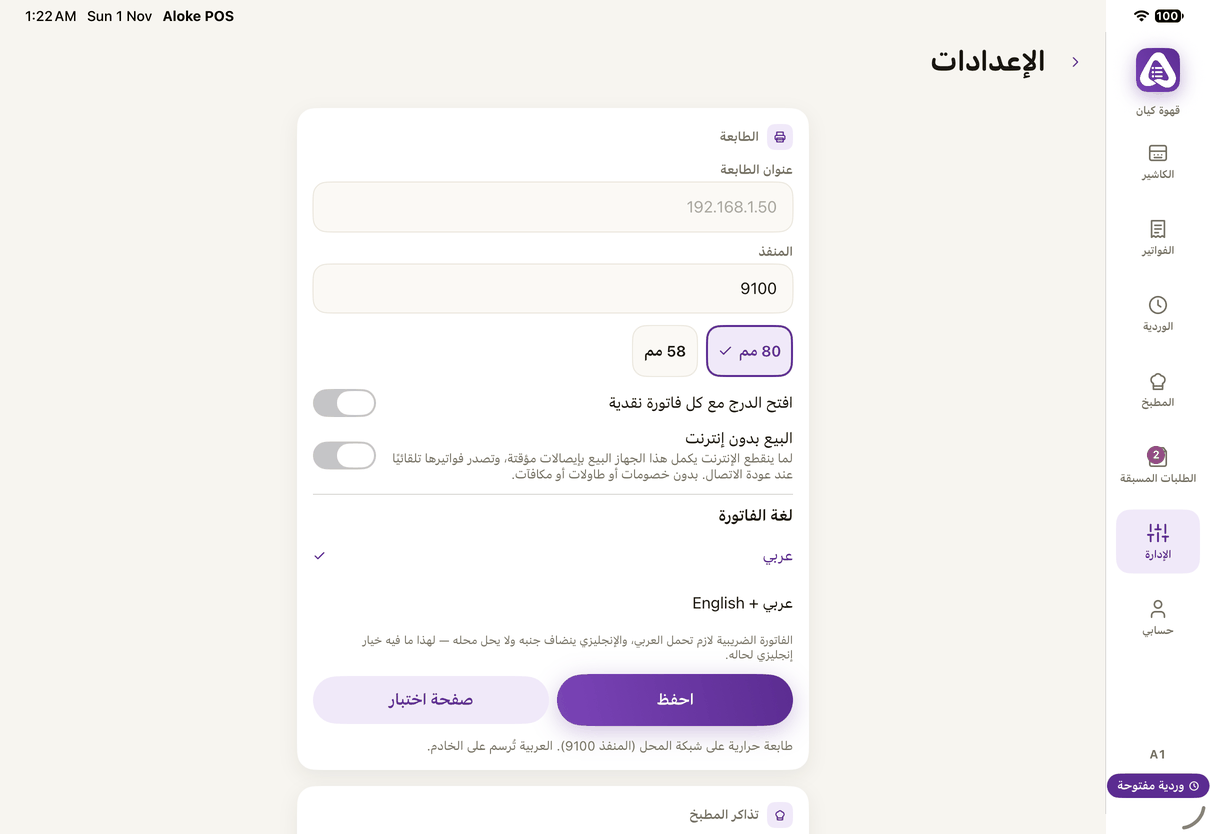
«Sell without internet» in the device's settings: off until a manager turns it on. - When the internet drops the top says «Offline — selling continues with temporary receipts». Sell as usual, and the receipt prints «Temporary receipt — not a tax invoice» with its number.
- When the connection returns the temporary receipts are sent and their invoices issued. One not sent yet shows «Temporary — waiting to sync».