 Aloke
AlokeComplaints, suggestions and reviews
Messages from your customers in Aloke Wallet, answering them, and public reviews.
- Aloke Owners
- Web, iPhone and iPad, Android
Your customers send you complaints and suggestions from Aloke Wallet, and can complain about an invoice and mark the item that went wrong. After buying from you they can rate your shop with stars.
- Open «آراء العملاء», then «الشكاوى والاقتراحات».
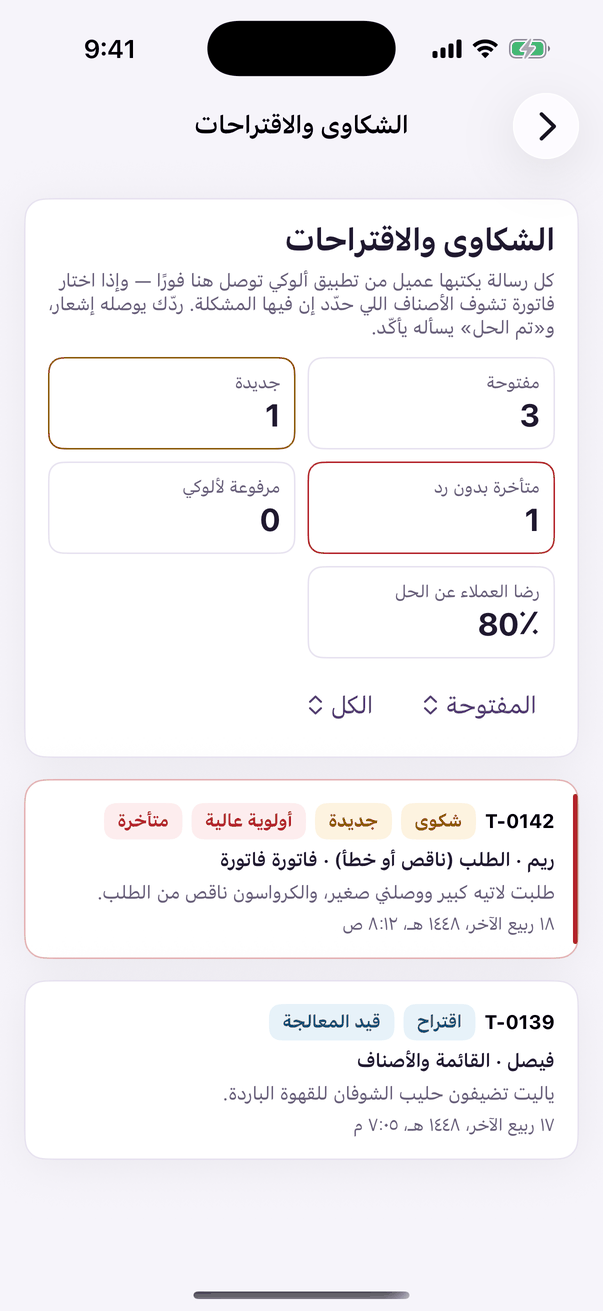
«Complaints and suggestions»: your customers' messages and their state. - Filter by status and kind. Overdue ones are marked.
- Open a ticket: you see what the customer wrote, the invoice or order it is about, and the flagged item under «المشكلة هنا».
- Write «ردّك للعميل» and press «أرسل», or an internal note for your team that the customer never sees.
- Set the status («قيد المعالجة», «تم الحل», «إغلاق مع الشكر») and assign it to a team member if you like.
- Reviews: «آراء العملاء», then «التقييمات». «ردّ علنًا» puts your reply under the review for everyone; «بلّغ ألوكي» if a review is abusive.