 Aloke
The influencer's gift and the follower code
A gift from your menu in your brand's name, and a code the followers say when they order.
- Aloke Owners
- Web, iPhone and iPad, Android
In an influencer's campaign you can send them a gift from your menu, and give their followers a code. The gift reaches them in your brand's name, and the code shows you how many came through them.
- Open the campaign and press «أرسل هدية» (Send a gift).
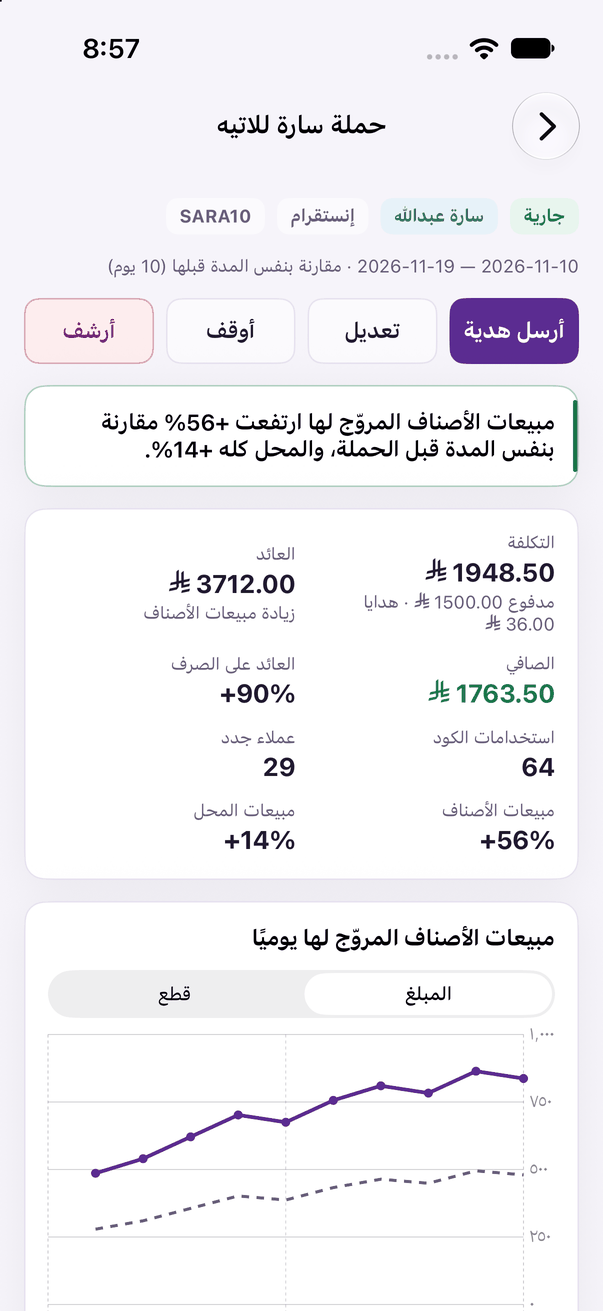
A campaign's report: the promoted items' sales before and during it, the code and the gift, the cost and the return. - Choose the items with their options and add-ons, set «صالحة لمدة» (Valid for), write «رسالة للمؤثر (اختياري)» (A message, optional), then «أرسل الهدية» (Send the gift).
- For the code: in «تعديل» (Edit) switch on «أعطِ المتابعين كود يقولونه عند الطلب» (Give followers a code to say when they order), and type «الكود» (The code) or press «اقترح» (Suggest).